
 AI Agent That Knows Your
Business
AI Agent That Knows Your
Business

Your data, your rules, and your processes.
Designed to adapt to your specific business needs with custom logic.
Own.Assistant simplifies daily operations by unifying your data and knowledge into one intelligent system — integrating seamlessly with communication platforms and web-based systems, including Microsoft 365 tools, Messenger, WhatsApp, and any others.




Available 24/7, handling thousands of passenger inquiries during peak summer season — from sailing schedules and ticket prices to route planning and travel information.
Deployed on jadrolinija.hr
Read more
Own.Solutions developed an AI-powered assistant tailored to fit the unique needs of a compliance-driven environment.
Built around Resimac's own credit policies and procedures, helping employees find and understand the information they need in their daily work.


Each implementation is configured to your organization's data, structure, and workflows, ensuring adoption, trust, and measurable impact.


Starts with a single use case and expands naturally across departments while maintaining consistency, accuracy, and governance.

Find the exact information you need within seconds - directly from your documents, systems, and internal knowledge.

Connected to your live data sources — schedules, prices, availability, and route changes. Every answer reflects what's true right now, not yesterday.

Streamline repetitive processes such as reporting, data lookup, approvals, and documentation so teams can focus on higher-value work.

Enforce internal policies, support audits, and maintain regulatory alignment with traceable, rule-based responses.

Access clear procedures, policies, and templates, helping employees follow the right steps every time and shorten onboarding.

Enable teams to act confidently with structured, accurate, and always-up-to-date internal insights.

Adapts to your language, data structure, and security model - integrating seamlessly with existing tools and environments.
Starts with a single use case and expands naturally across departments while maintaining consistency, accuracy, and governance.
Security & Compliance Built In!
Own.Assistant prioritizes customer data protection and regulatory compliance through:


Own.Assistant works with your data - but never exposes it. Full control, full compliance.


Full visibility, Control, and Insight - all in one place!
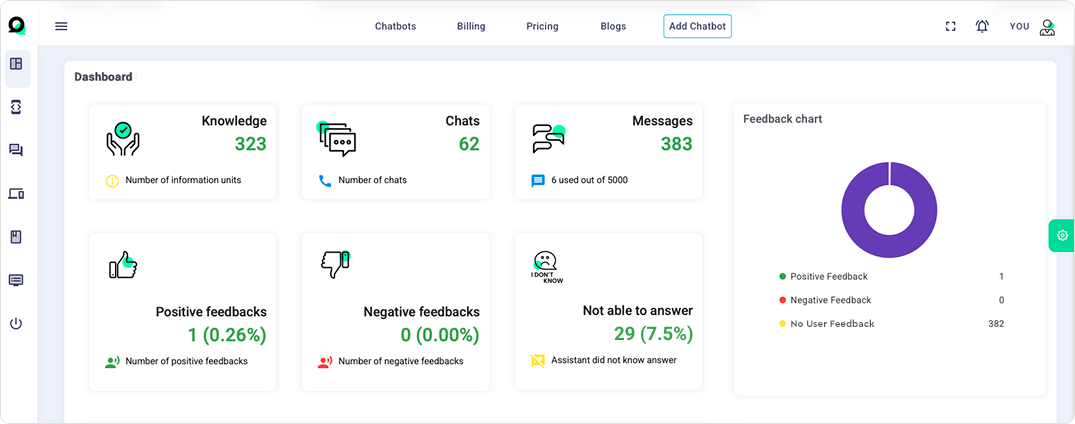
The Own.Assistant dashboard gives your organization complete transparency over its AI environment:
 Add new documents and data sources effortlessly
 Track usage across departments
 Monitor answer accuracy and compliance
 Identify where AI delivers the most value
Ensure continuous learning, measurable ROI, and complete governance - giving every organization the AI it can fully control.
 Your Questions, Answered
Own.Assistant relies solely on your organization’s verified data and documents. AI responses are traceable and auditable, ensuring factual accuracy.
All messages are anonymized, data is never used for training, and deployments use secure multi-tenant or dedicated environments.
Yes. Own.Assistant integrates seamlessly across web platforms, including your website, intranet, customer portal, CRM, HR systems, and internal knowledge bases, as well as with communication tools such as Microsoft Teams, Slack, WhatsApp, Messenger, Viber, and more. All integrations work smoothly without forcing new processes or changes to existing workflows.
The dashboard provides detailed analytics, highlighting usage, accuracy, and ROI across teams.
From HR to finance, operations to customer support, and from the public sector to regulated industries – Own.Assistant delivers measurable impact across high-trust, high-impact environments.
Own.Assistant chatbot can understand and answer in 95 different languages
Certainly. You can enjoy a 7-day free trial period with Own.Assistant at no cost. No credit card required
Yes, you can cancel your subscription at any time. You will still have access to your account until the end of your billing period
Yes, Own.Assistant allows you to control chatbot knowledge by accessing Knowledgebase view within Own.Assistant Portal. On that page you are able to see all data your chatbot is trained on in format of questions and answers. Also, you can see how many times that particular question has been asked by users. Additionally, you have the ability to add, edit, or delete data units in your Knowledgebase giving you full control over information that will be presented to your customers.
Yes, you can customize the colors, avatar, widget color, icon, logo, chatbot messages, quick prompts (predefined messages), and the message that should be shown in case the chatbot does not have enough information to answer a question.
Your chatbot will be trained on the all website URLs or file content assigned as data source. On chatbot configuration, you can enter a Website URL (like a FAQ page) or upload a file (DOC, PDF, TXT, PPT, XLS, CSV) with the knowledge your chatbot needs. The more content you provide, the better the chatbot will be able to answer the questions. Find more information on How to train your chatbot blog post.
You can upload one or multiple data files in PDF, DOC, TXT, XLS, PPT, CSV format, or add a link to your website to be scraped
We store your data in an encrypted format on Amazon Cloud. We do not share or sell your data to any third party. When you ask a question, in some cases, relevant data chunks are sent to a third party AI model to generate an answer. Note that when question is made on same or similar way as defined in your knowledgebase, answers are sent directly from knowledgebase and not sent to third party AI model.
Sure, you can see top 5 most asked questions in your Dashboard or frequency of all asked questions in Knowledgebase view
If you find yourself dissatisfied with how the chatbot is trained based on your website URL(s), try with using the Advanced parsing mode option. If this does not yield the desired results, it may indicate that your website's code is not correctly formatted or just not suitable for data collection. In such instances, you can create your own knowledgebase content by utilizing the data file option (DOC, PDF, TXT, PPT, XLS, CSV). Furthermore, you can control chatbot knowledge about your business by accessing Knowledgebase view within Own.Assistant Portal. Using this option you can add, edit or delete Knowledgebase units.
Your data is treated with utmost confidentiality and is not used for any other purposes without your explicit consent. For more information, you can refer to OpenAI's privacy notice: OpenAI Privacy Policy
You can embed the chatbot on your own website as
widget, full page window or iFrame. You can find all
information about integrating your chatbot in
Integration view of Own.Assistant Portal.
To
integrate a Own.Assistant chatbot into your WordPress
website, you can use the WordPress plugins for adding
custom JS code (e.g.
Simple Custom CSS and JS, or
Header and Footer Scripts plugin).
Simply copy the JavaScript code available in the
'Integration - Widget' section of the Own.Assistant
Portal, and paste it into your chosen plugin.
